Everybody’s doing it. I guess I need to do an AI, too. In my home, I have a few different tools that use generative AI and LLMs. I talk to my Home Assistant Voice Preview voice assistants which leverage a self-hosted Ollama running llama3.2. I use OpenWebUI, tried Tabby as an experimental coding assistant. I use DeepInfra for larger models that don’t fit on my own GPU.
However, my problem is that each program supports different providers and models. Some support OpenAI style APIs to any provider, some only support Ollama APIs. If I wanted to forward my Home Assistant queries to DeepInfra, it wasn’t easy to do because there wasn’t an integration. If I wanted to change the model that Tabby uses between different models, I had to redeploy the service.
What I wanted is a way was to be able to support both Ollama and OpenAI clients and be able to forward requests to different upstream providers based on policy.
My Requirements
I had a few different clients that connected to LLM providers:
- Home Assistant - Supports OpenAI, Ollama, etc.
- Open WebUI - Supports OpenAI compatible and Ollama
- Tabby - Coding assistant
- My various test projects
I had single NVIDIA GeForce 1080 Ti and NVIDIA GeForce 2080 at home which was fine for some work, but would take too long to respond to my voice assistant. Home Assistant did support OpenAI, but didn’t support a custom OpenAI endpoint so I couldn’t redirect it to a paid-for LLM provider, such as DeepInfra or OpenRouter. I wanted the flexibility to send any client to any provider without worrying about API compatibility or API keys.
I was looking for some kind of self-hosted LLM call router that could route requests.
The landscape
Some initial research showed that there were a number of projects
- ArchGW
- LangFuse
- Helicone
- LiteLLM
The Langfuse Helm chart wanted to deploy 3x Apache Zookeeper, 3x Clickhouse, Redis, MinIO, a web app, and a worker. While I could cut the number of replicas, that was too much for a home lab that had TPS in the order of <5 request per hour.
ArchGW provided a way to route calls based on a fast AI analysis of the prompt, but I couldn’t get it to route in my testing. A model alias seemed simpler.
Helicone was focused on observability–how long do prompts take to query, etc. Cool, but not what I need
LiteLLM
Why LiteLLM?
LiteLLM seemed simple enough and do what I wanted, but little did I know it was going to be a giant pain.
Home Assistant needed to call via the Ollama API to LiteLLM, but LiteLLM didn’t natively support Ollama. I looked for an Ollama-OpenAI proxy and found [this one].
After adding it to Home Assistant and trying the chat feature, I’m faced with an opaque error.
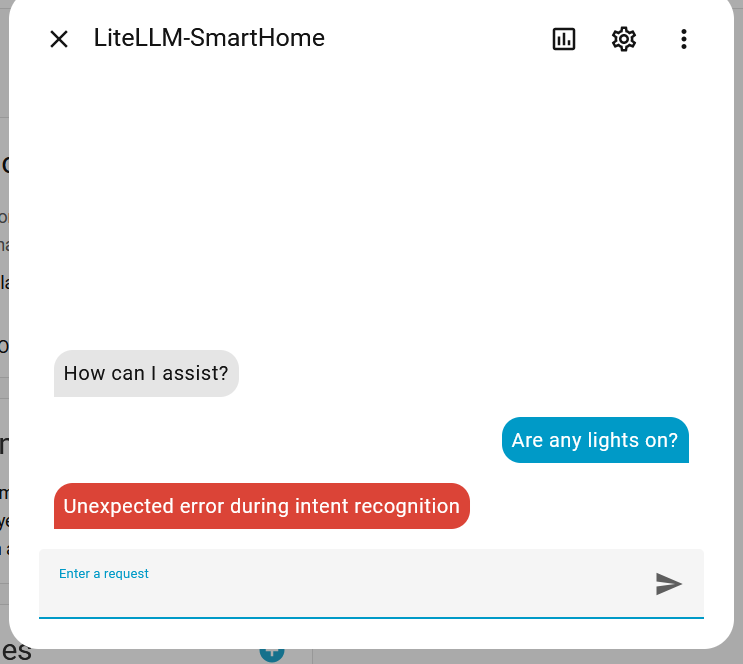
A Wireshark packet capture shows several proxy calls:

The final call to Ollama shows this request:
 1
 2
 3
 4
 5
 6
 7
 8
 9
10
11
12
13
14
15
| {
"n": 1,
"model": "llama3.2:latest",
"top_p": 1,
"stream": false,
"messages": [
{
"role": "user",
"content": "### System:\nYou are a voice assistant for Home Assistant.\nAnswer questions about the world truthfully.\nAnswer in plain text. Keep it simple and to the point.\nWhen controlling Home Assistant always call the intent tools. Use HassTurnOn to lock and HassTurnOff to unlock a lock. When controlling a device, prefer passing just name and domain. When controlling an area, prefer passing just area name and domain.\nWhen a user asks to turn on all devices of a specific type, ask user to specify an area, unless there is only one device of that type.\nThis device is not able to start timers. Produce JSON OUTPUT ONLY! Adhere to this format {\"name\": \"function_name\", \"arguments\":{\"argument_name\": \"argument_value\"}} The following functions are available to you:\n{'type': 'function', 'function': {'name': 'HassTurnOn', 'description': 'Turns on/opens a device or entity', 'parameters': {'type': 'object', 'required': [], 'properties': {'name': {'type': 'string'}, 'area': {'type': 'string'}, 'floor': {'type': ... (litellm_truncated 11355 chars)"
}
],
"temperature": 1,
"presence_penalty": 0,
"frequency_penalty": 0
}
|
Curious. What is this:
1
| Produce JSON OUTPUT ONLY! Adhere to this format {\"name\": \"function_name\", \"arguments\":{\"argument_name\": \"argument_value\"}} The following functions are available to you:\n{'type': 'function', 'function': {'name': 'HassTurnOn', 'description': 'Turns on/opens a device or entity'
|
Somewhere, the request with a native structured tool call is getting turned into a textual message that we hope the model can understand. The response gets passed back as a JSON serialized as a string, not an actual tool call.
 1
 2
 3
 4
 5
 6
 7
 8
 9
10
11
12
13
14
15
16
17
18
19
20
21
22
23
24
25
26
27
28
29
30
31
32
33
34
35
36
37
38
39
40
41
42
43
44
45
46
47
48
49
50
| chatcmpl-0a38a5eb-da8b-4485-92e7-91eef8955916
{
"n": 1,
"model": "llama3.2:latest",
"top_p": 1,
"stream": true,
"messages": [
{
"role": "user",
"content": "### System:\nYou are a voice assistant for Home Assistant.\nAnswer questions about the world truthfully.\nAnswer in plain text. Keep it simple and to the point.\nWhen controlling Home Assistant always call the intent tools. Use HassTurnOn to lock and HassTurnOff to unlock a lock. When controlling a device, prefer passing just name and domain. When controlling an area, prefer passing just area name and domain.\nWhen a user asks to turn on all devices of a specific type, ask user to specify an area, unless there is only one device of that type.\nThis device is not able to start timers.\nYou ARE equipped to answer questions about the current state of\nthe home using the `GetLiveContext` tool. This is a primary function. Do not state you lack the\nfunctionality if the question requires live data.\nIf the user asks about device existence/type (e.g., \"Do I have lights in the bedroom?\"): Answer\nfrom the static context below.\nIf the user asks about the CURRENT state, value, or mode (e.g., \"Is the lock l... (litellm_truncated 6322 chars)"
}
],
"temperature": 1,
"presence_penalty": 0,
"frequency_penalty": 0
}
{
"id": "chatcmpl-0a38a5eb-da8b-4485-92e7-91eef8955916",
"model": "llama3.2:latest",
"usage": {
"total_tokens": 2026,
"prompt_tokens": 2008,
"completion_tokens": 18,
"prompt_tokens_details": null,
"completion_tokens_details": {
"text_tokens": null,
"audio_tokens": null,
"reasoning_tokens": 0,
"accepted_prediction_tokens": null,
"rejected_prediction_tokens": null
}
},
"object": "chat.completion",
"choices": [
{
"index": 0,
"message": {
"role": "assistant",
"content": "{\"name\": \"HassBroadcast\", \"arguments\": {\"message\": \"Hello\"}}",
"tool_calls": null,
"function_call": null
},
"finish_reason": "stop"
}
],
"created": 1757222298,
"system_fingerprint": null
}
|
https://github.com/BerriAI/litellm/issues/11273
https://github.com/BerriAI/litellm/blob/9a62b9bdb9ff217a0683047756588b2f5bd59c27/litellm/litellm_core_utils/prompt_templates/factory.py#L3842
Too much Vibe coding
Then I started digging into the code to understand why LiteLLM thinks this provider/model doesn’t support structured tool calls.
I came across this code:
 1
 2
 3
 4
 5
 6
 7
 8
 9
10
11
12
13
14
15
16
17
18
19
20
21
22
23
24
25
26
27
28
29
30
31
32
| if (
custom_llm_provider == "ollama"
and custom_llm_provider != "text-completion-openai"
and custom_llm_provider != "azure"
and custom_llm_provider != "vertex_ai"
and custom_llm_provider != "anyscale"
and custom_llm_provider != "together_ai"
and custom_llm_provider != "groq"
and custom_llm_provider != "nvidia_nim"
and custom_llm_provider != "cerebras"
and custom_llm_provider != "xai"
and custom_llm_provider != "ai21_chat"
and custom_llm_provider != "volcengine"
and custom_llm_provider != "deepseek"
and custom_llm_provider != "codestral"
and custom_llm_provider != "mistral"
and custom_llm_provider != "anthropic"
and custom_llm_provider != "cohere_chat"
and custom_llm_provider != "cohere"
and custom_llm_provider != "bedrock"
and custom_llm_provider != "ollama_chat"
and custom_llm_provider != "openrouter"
and custom_llm_provider != "vercel_ai_gateway"
and custom_llm_provider != "nebius"
and custom_llm_provider not in litellm.openai_compatible_providers
):
if custom_llm_provider == "ollama":
# X
elif (
# Y
else:
# Z
|
What is going on here?
Let’s just use some basic boolean algebra. If A AND NOT X AND NOT Y AND NOT Z simplifies to If A and in the above code, the Y and Z code paths are not possible to hit. Thus, this code is equivalent to:
1
2
| if custom_llm_provider == "ollama":
# X
|
Somebody filed an issue asking about this, but the maintainers didn’t understand the problem and it auto closed. Yet people keep adding new blocks of code to this method.
LiteLLM crashes during Ollama
For the longest time, LiteLLM would just crash any time I tried to work with Ollama with an error: Unclosed client session. The issue just sat there https://github.com/BerriAI/litellm/issues/11657
Slow as molasses
I have no idea why LiteLLM was so slow for me randomly. I experienced this across multiple different versions including up to my latest tested version v1.81.3-stable. XHR requests would take up to 3 minutes! This was running on a node with plenty of CPU, RAM, against a Postgres database
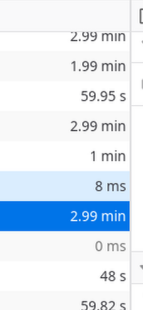
It’s so slow, yet somehow I can end up with duplicate models because I don’t know the requests are actually succeeding.

It’s not running on a slow computer at all, it’s got 64GB of RAM, 8 cores, not overloaded.
Conclusion
I can’t take it anymore. I’m either an idiot or something is seriously broken. I don’t even know what stable means anymore. I’m building my own LLM Proxy. It won’t have all the features, but at least the proxy will work. Stay tuned for a post.
Donate
If you've found these posts helpful and would like to support this work directly, your contribution would be appreciated and enable me to dedicate more time to creating future posts. Thank you for joining me!