Everybody’s doing it. I guess I need to do AI, too. In my home, I have a few different tools that use generative AI and LLMs. I talk to my Home Assistant Voice Preview voice assistants which leverage a self-hosted Ollama running llama3.2. I use Open WebUI, tried Tabby as an experimental coding assistant. I use DeepInfra for larger models that don’t fit on my own GPU.
However, my problem is that each program supports different providers and models. Some support OpenAI style APIs to any provider, some only support Ollama APIs. If I wanted to forward my Home Assistant queries to DeepInfra, it wasn’t easy to do because there wasn’t an integration. If I wanted to change the model that Tabby uses between different models, I had to redeploy the service.
What I wanted was a way to support both Ollama and OpenAI clients and be able to forward requests to different upstream providers based on policy.
My Requirements
I had a few different clients that connected to LLM providers:
- Home Assistant - Supports OpenAI, Ollama, etc.
- Open WebUI - Supports OpenAI compatible and Ollama
- Tabby - Coding assistant
- My various test projects
I had a single NVIDIA GeForce 1080 Ti and NVIDIA GeForce 2080 at home which was fine for some work, but would take too long to respond to my voice assistant. Home Assistant did support OpenAI, but didn’t support a custom OpenAI endpoint so I couldn’t redirect it to a paid-for LLM provider, such as DeepInfra or OpenRouter. I wanted the flexibility to send any client to any provider without worrying about API compatibility or API keys.
I was looking for some kind of self-hosted LLM call router that could route requests.
The landscape
Some initial research showed that there were a number of projects:
- ArchGW
- Langfuse
- Helicone
- LiteLLM
The Langfuse Helm chart wanted to deploy 3x Apache Zookeeper, 3x Clickhouse, Redis, MinIO, a web app, and a worker. While I could cut the number of replicas, that was too much for a home lab that had TPS in the order of <5 requests per hour.
ArchGW provided a way to route calls based on a fast AI analysis of the prompt, but I couldn’t get it to route in my testing. A model alias seemed simpler.
Helicone was focused on observability–how long do prompts take to query, etc. Cool, but not what I need.
LiteLLM
Why LiteLLM? LiteLLM seemed simple enough and do what I wanted, but little did I know it was going to be a giant pain.
Tool calls are breaking my Home Assistant
Home Assistant needed to call via the Ollama API to LiteLLM, but LiteLLM didn’t natively support Ollama. I looked for an Ollama-OpenAI proxy and found this one.
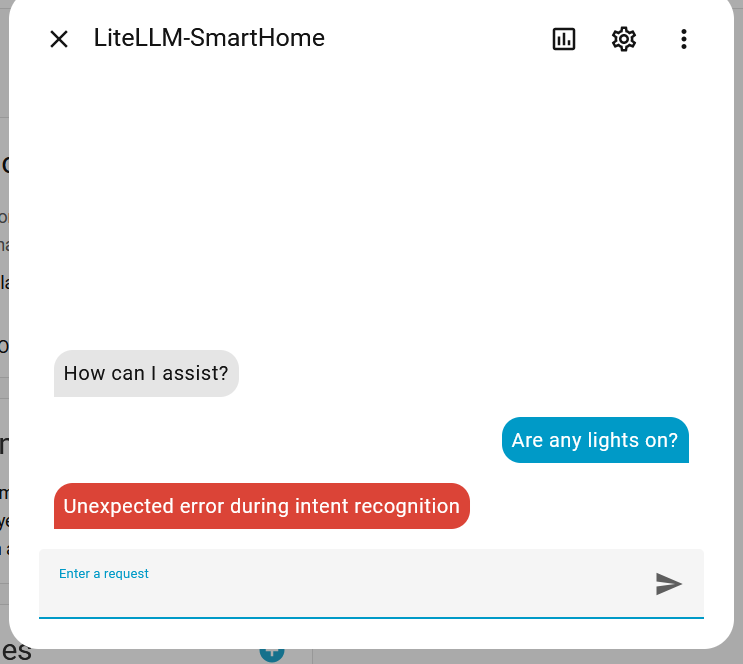
After adding it to Home Assistant and trying the chat feature, I was faced with an opaque error.
A Wireshark packet capture shows several proxy calls:

The final call to Ollama shows this request:
| |
Curious. What is this:
| |
Somewhere, the request with a native structured tool call is getting turned into a textual message that we hope the model can understand. The response gets passed back as JSON serialized as a string, not an actual tool call.
| |
The offending code lives at litellm/litellm_core_utils/prompt_templates/factory.py (permalink).
Not the only issue about Ollama integratio
Too much Vibe coding
Then I started digging into the code to understand why LiteLLM thinks this provider/model doesn’t support structured tool calls.
I came across this code in the LiteLLM source:
| |
What is going on here?
Let’s just use some basic boolean algebra. If A = 1 AND NOT A = 2 AND NOT A = 3 AND NOT A = 3 simplifies to If A = 1 and in the above code, the Y and Z code paths are not possible to hit. Thus, this code is equivalent to:
| |
This has indications of either a model without thinking, doing what already existed. Somebody filed an issue asking about this, but the maintainers didn’t understand the problem and it was auto-closed. Yet people keep adding new blocks of code to this method.
LiteLLM crashes during Ollama calls
For the longest time, LiteLLM would just crash any time I tried to work with Ollama with an error: “Unclosed client session.” The issue just sat there: https://github.com/BerriAI/litellm/issues/11657
Slow as molasses
I have no idea why LiteLLM was so slow for me randomly. I experienced this across multiple different versions including up to my latest tested version v1.81.3-stable. XHR requests would take up to 3 minutes! This was running on a node with plenty of CPU and RAM, against a Postgres database.

It’s so slow, yet somehow I can end up with duplicate models because I don’t know the requests are actually succeeding.

It’s not running on a slow computer at all, it’s got 64GB of RAM, 8 cores, not overloaded.
Conclusion
I can’t take it anymore. I’m either an idiot or something is seriously broken. I don’t even know what stable means anymore. I’m building my own LLM Proxy. It won’t have all the features, but at least the proxy will work. Stay tuned for the next post.
Update: 2026-10-14: I’ve since switched to GOModel. It is more light-weight and I’ve not encountered any major bugs like I have with LiteLLM.