Blogging on the Fediverse with ActivityPub

This article is part of the ActivityPub on Hugo series.

Previously, if you wanted to subscribe to changes from this blog, you’d have to subscribe to the RSS feed, but as of today you can also subscribe to it in your preferred Fediverse client, like Mastodon. Note this is considered Beta quality. If you have any issues, let me know.

What is the Fediverse? It’s a protocol for federated (meaning many independently operated) social networks, kind of like email. Under the hood, it uses a protocol called ActivityPub to define the interactions between different servers.

There’s a number of big implementations of this, like Mastodon, that I could have used. However, I wanted to see if it was possible to integrate directly into my static website generator, Hugo and generate all the content directly out of the posts I already write without having to maintain another program and expose another domain name for people to remember (e.g. blog@mastodon.technowizardry.net.)

This post walks through the work I did to make this work.
I like the idea of Nix, but don't enjoy using it

I’ve been playing with Nix and NixOS a lot more lately. I installed NixOS on one of my servers, I installed the Nix CLI on my laptop, I tried to use Nix to build a Docker image, I use Nix flakes.

This post was written from the perspective of a person new to Nix, but experienced with other computer languages. Thus, it’s probable that I might be doing something wrong or maybe complaining about something that’s obvious to you. However, these are issues that others may face.

It was also written over several months as I gathered issues, so even looking back, I see mistakes.

Proxy ARP is broken on Unifi U7 Lite

For several years, I had 2x Unifi U6 Lite Access Points and they worked great. I had a special Wi-Fi network for my phones and laptops with a number of settings enabled but then I upgrade to the U7 Lite and immediately started having issues where my phone would disconnect. I got frustrated enough to break out my handy tool box to figure what was going wrong.

Auto enable user namespaces in Kubernetes

When you run a container, the process IDs are namespaced and different in the container vs the host, the network stack is namespaced, the file system mounts are namespaced, but a process running as root in the container is running as root outside the container. This is risk because many privilege escalation vulnerabilities in Linux can be exploited because of this common user id.

Linux user namespaces aims to mitigate risks with running a process as root or other shared user ID where a vulnerability could allow a containerized process to escape a namespace and have privileges in the host. For example, process running as root in a container, would be marked as root outside the host without user namespaces or a process that has a UID that exists on the host.

User namespaces attempt to fix this by saying UID=0 inside the container actually is UID=12356231 on the host. Thus, a breakout is not as bad as it could be without user namespaces.

In this post, I’m going to walk through how I use Kyverno, a Kubernetes native policy system to easily enable user namespaces in pods where it can be.

Guaranteed Quality of Service in my Home Lab

A few times in my Kubernetes clusters, I’ve encountered situations where some process consumes all the CPU or RAM which starves other services for critical services. For example, in one situation, Longhorn consumed all CPU and RAM and my pi-hole running on the same machine stopped being able to process DNS requests. Other issues have included having to shut down one of my worker nodes and the other nodes not having enough capacity to take on pods and important pods not getting scheduled or even a mistake when I changed the pod selector labels and Kubernetes just spawned thousands of pods.

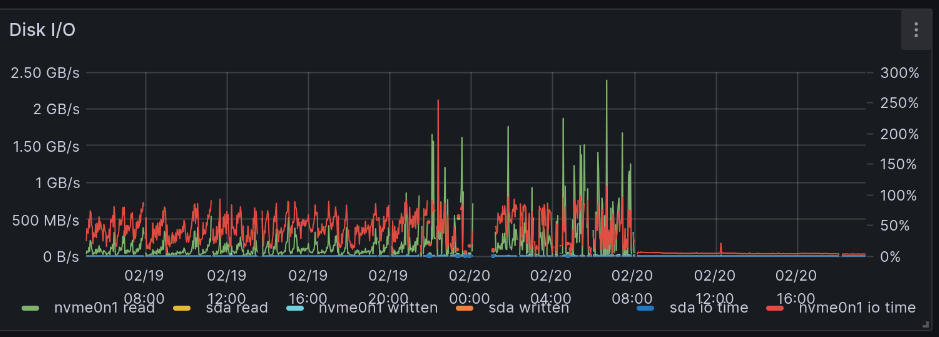
The graph below shows Disk I/O of a node with excessive disk writes because the OS is swapping RAM out to desk and back. A graph of Disk I/O showing large amounts of disk I/O as the host swaps RAM to disk, then it finally fails

My home lab servers are now running what I consider to be “business critical” services and I don’t want those to be impacted. Kubernetes has several different knobs we can use to improve this such as leveraging Linux’s cgroups to ensure that specific pods get a certain amount of CPU and RAM. It also supports prioritization, so that certain pods get scheduled and others get evicted if there isn’t enough space.

Or even lately, I’ve been hitting the max pod limit of 110 pods on my single-node cluster. Not everything is important and I want to make sure certain cron jobs always run even if I’m running some low-priority jobs. Turns out it is possible to be running 110 different pods.